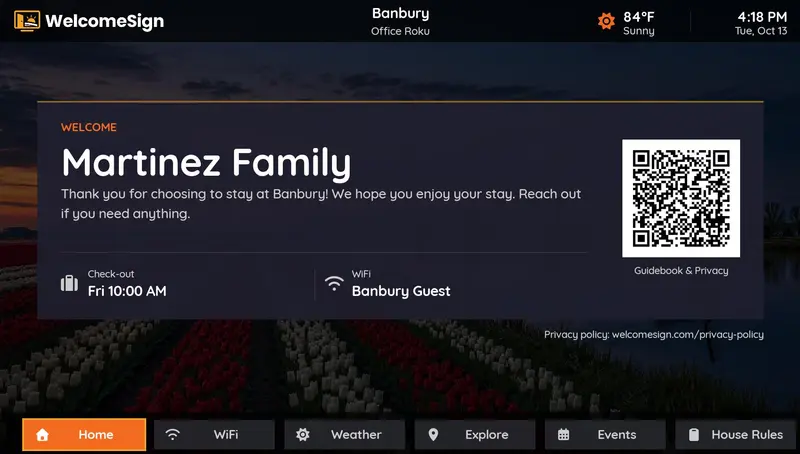
Put a welcome screen on your Airbnb's TV. Guests walk in, switch it on, and see their name, the WiFi password, check-out time and your contact number. No binder to dig through and no 11 PM "what's the WiFi?" texts.
Most guests do the same thing within ten minutes of arriving: drop the bags, find the WiFi, and turn on the TV. A welcome screen meets them there. The details they would otherwise message you about are already on the biggest screen in the room.
The house manual in the Airbnb app is easy to miss and the printed binder ends up under a stack of magazines. The TV gets switched on every stay. It's also an easy way to look like a Superhost-level operation without extra work on turnover day.
These are the questions that fill your inbox. Put the answers where guests already look.
"Welcome, Sarah & family." A personal greeting makes the stay feel expected and gets mentioned in reviews.
The single most-asked guest question, answered before anyone has to ask it.
On screen the whole stay, so the last morning doesn't turn into a late checkout negotiation.
Guests can reach you quickly if something goes wrong, without searching the app.
Today's forecast for the property, handy for beach, lake and mountain stays.
Changed the WiFi password? Update it in the dashboard and every TV shows the new one.
No technician, no extra hardware beyond a Roku.
Create a free account, then enter your property, WiFi details and welcome message.
Add the free WelcomeSign channel from the Roku Channel Store. It shows a short pairing code.
Enter the code in your dashboard. The welcome screen appears whenever the TV is on.
An Airbnb welcome screen is a digital greeting shown on your listing's TV. When guests switch the TV on they see a welcome message with their name, the WiFi network and password, check-in and check-out times, your contact number, and the local weather. It does the job of a printed welcome sign or house binder, but it stays current and guests actually see it.
Create a free WelcomeSign account and enter your property details and welcome message. Then install the free WelcomeSign channel from the Roku Channel Store on the TV's Roku, open it to get a pairing code, and enter that code in your dashboard. The welcome screen is live in about 15 minutes.
Yes. WelcomeSign is free forever for one property with up to 2 TVs, and you don't need a credit card. If you host more listings, Hoster covers up to 5 properties with unlimited TVs for $29 a year, and Business covers up to 20 for $59 a year.
WelcomeSign runs today on every Roku streaming device and Roku TV. If your rental's TV isn't a Roku, a Roku streaming stick costs about $30 and plugs into any HDMI port. Apps for Samsung, LG, Fire TV, Apple TV and Google TV are in development.
No. WelcomeSign is an independent product for short-term rental hosts. It works for any listing, whether you book through Airbnb, VRBO, Booking.com or direct.
Free for your first listing, with no credit card required. Most hosts are live in about 15 minutes.
Create Your Free Account →