An Interactive TV Display for Your Vacation Rental

Turn the TV you already have into an interactive display that greets every guest with WiFi details, check-in and check-out times, local weather, and a warm welcome — the moment they switch it on.

What is a vacation rental interactive display?

A vacation rental interactive display turns your property's television into a single, always-on screen that answers the questions guests ask most. Instead of a printed binder, a laminated WiFi card, and a folder of instructions, everything lives on the TV — and you can update it from your phone between stays.

For short-term rental hosts, that means a more professional first impression and far fewer "what's the WiFi password?" messages. WelcomeSign powers this display on the hardware your guests already use: the TV in the living room.

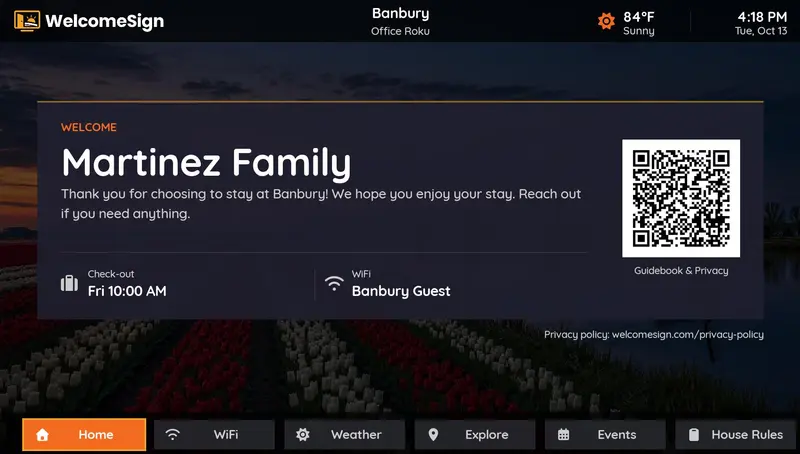
Vacation rental interactive TV display showing a personalized guest greeting, check-out time, local weather, WiFi network, and a guidebook QR code

Everything Your Guests Need, On One Screen

The details hosts get asked about most — shown clearly the moment guests turn on the TV.

WiFi Network & Password

The number-one guest question, answered before it's asked. Shown large and legible on the screen.

Check-in & Check-out Times

Arrival and departure times displayed clearly, so there's no confusion at either end of the stay.

Personalized Welcome

Greet guests by name with a custom message that makes the place feel expected and cared for.

Local Weather

Current conditions and forecast for the property's location to help guests plan their day.

Host Contact Number

Your phone number on screen so guests can always reach you without digging through messages.

Property Information

House name and the essential details guests need at a glance the moment they walk in.

Why a digital display beats a paper guidebook

It's always current. Change your WiFi password or check-out time once in your dashboard and every TV updates — no reprinting, no outdated binders left in a drawer.

Guests actually see it. A TV that lights up with a welcome screen gets noticed in a way a printed sheet never does, so the important details land instead of getting lost.

It looks professional. A clean, branded display signals a well-run property — the kind of detail that shows up in five-star reviews. For more on that, see our guide on reducing repeat guest questions.

Up and Running in About 15 Minutes

No technical skills and no extra hardware — just the Roku you may already have.

1

Create your free account

Sign up in under a minute and add your property details and a personalized welcome message.

2

Add WelcomeSign to your TV

Install the free WelcomeSign channel from the Roku Channel Store. Your TV shows a short pairing code.

3

Pair & personalize

Enter the code in your dashboard and your display goes live — update it any time from your phone.

Available now on Roku. Works on all Roku streaming devices and Roku TVs. Get the app or join the waitlist for other platforms.

Vacation Rental TV Display FAQs

What is a vacation rental interactive display?

It's a digital screen — usually the property's existing TV — that shows guests WiFi credentials, check-in and check-out times, a personalized welcome, host contact details, and local weather. It replaces paper guidebooks with one always-on display you can update remotely.

How do I set up a TV display in my vacation rental?

Create a free WelcomeSign account, add your property details, then install the free WelcomeSign channel on your Roku. Enter the on-screen pairing code in your dashboard and your information appears. It takes about 15 minutes and needs no extra hardware.

What should I show on my vacation rental TV?

The most useful items are the WiFi name and password, check-in and check-out times, a greeting that names the guest, your contact number, and the local weather — the questions hosts get asked most often.

Which TVs and devices does the display work on?

WelcomeSign runs on all Roku streaming devices and Roku TVs today. Support for Fire TV, Apple TV, Google TV, Samsung, and LG is on the way — join the waitlist to hear when your platform launches.

Set Up Your Display Today

Free for your first property — no credit card required. Up and running in about 15 minutes.

Create Your Free Account →